
TL;DR

Turn your quiet moments into listening time
- Thousands of audiobooks, podcasts and originals
- Listen on your phone, tablet or Echo — also offline
- Cancel anytime
Proper placement and smart use of closet spaces can dramatically cut noise and improve sound quality. The key isn’t just absorbing sound but managing heat, airflow, and how sound travels through your space.
Ever wonder how some producers and AI enthusiasts keep their rigs quiet and cool without spending a fortune? The trick isn’t just in buying foam or fancy cases. It’s about where you put your gear and how you treat your space.
This article reveals the secrets behind the most effective acoustic dampening, placement strategies, and the surprisingly smart move of using closets as mini studios or rig sanctuaries. If you want quieter workspaces or better sound in your home studio, keep reading. You’ll learn simple, proven techniques that make a real difference.
Acoustic dampening
& the rig in the closet.
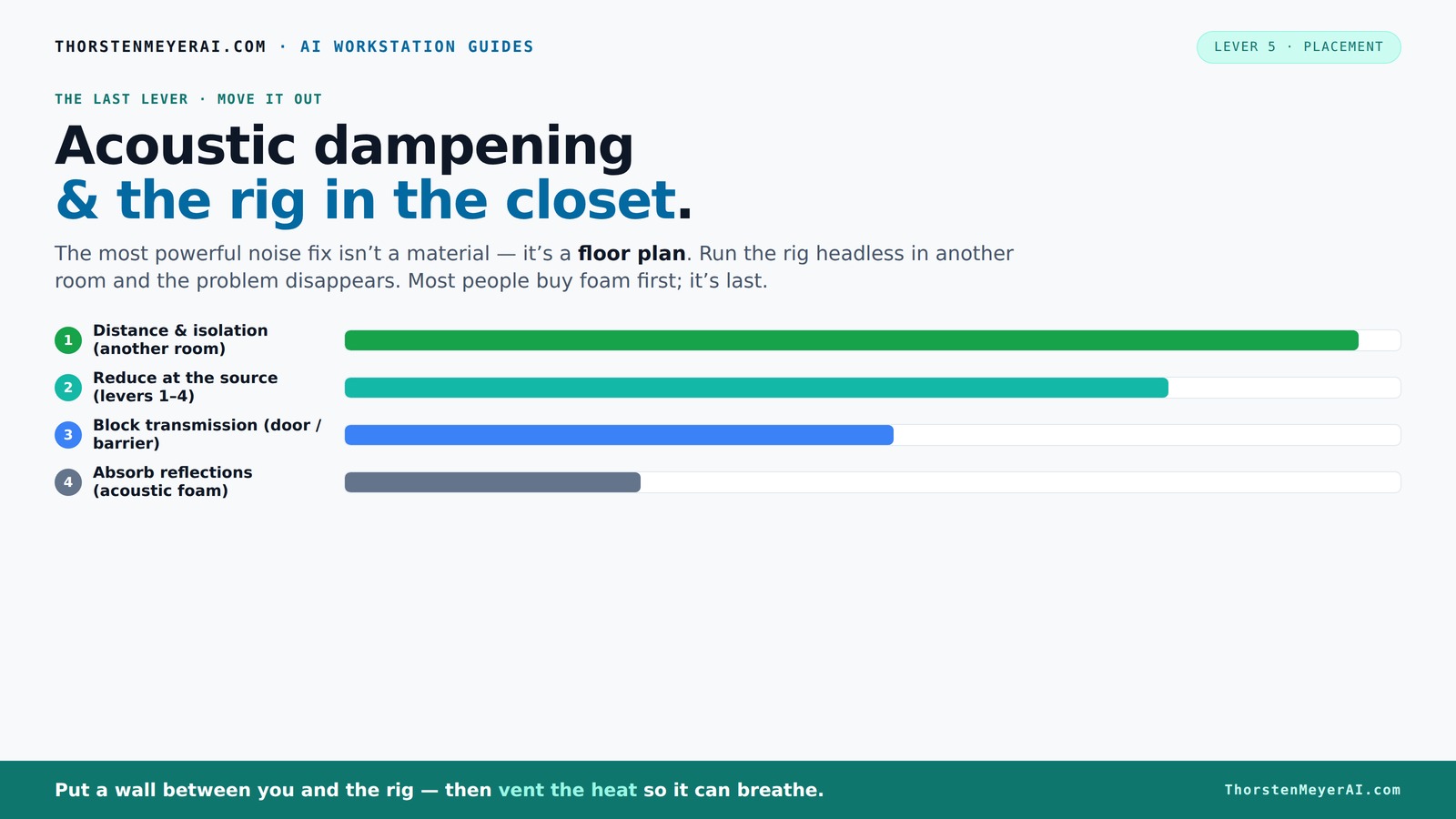
The most powerful noise fix isn’t a material — it’s a floor plan. A rig you can’t hear because it’s in another room beats any amount of foam. Tap the approaches in Part 1 to see what actually works.
(another room)
(levers 1–4)
(door / barrier)
(acoustic foam)
Contain the noise, not the heat
Key Takeaways
- Moving your rig into another room or closet is the most effective noise reduction method.
- Proper ventilation is non-negotiable—trapped heat kills silence and hardware lifespan.
- Acoustic foam reduces echoes but doesn’t block sound; combine it with barriers for best results.
- Anti-vibration pads and rubber feet cut down structure-borne hum, often overlooked.
- Closets can serve as mini studios or rigs when ventilation and heat management are addressed.
Popular right now

Bose QuietComfort Wireless Noise-Cancelling Over-Ear Headphones, Black

Bose QuietComfort True Wireless Earbuds with Active Noise Cancellation, Black

Bose QuietComfort Wireless Bluetooth Headphones with Active Noise Cancellation, Mic, USB‑C Charging, Deep Bass, 24‑Hour Battery – White Smok
As an affiliate, we earn on qualifying purchases.
Why Distance and Placement Beat Foam Every Time
Distance is the king of noise reduction. Moving your rig into another room, basement, or closet can cut noise levels to near silence where it matters most. Think of it like a sound barrier—less noise reaches you because it’s physically farther away.
For example, an AI workstation in a closet can operate at full throttle without disturbing your workspace. You SSH into it, while it roars in the background. Foam might soften echoes, but it won’t stop the noise from traveling.
How 'Rig in the Closet' Saves the Day — And the One Big Heat Trap to Watch
The 'rig in the closet' idea is a game-changer for noise. You can learn more about rig setup and acoustic treatment. It isolates the machine from your ears, keeping your space silent while the rig runs at full power. However, this approach introduces a significant challenge: heat buildup. Sealed closets can trap heat, leading to rising temperatures that threaten hardware longevity and performance.
The implications are serious—overheating can cause thermal throttling, hardware failure, or even fires in extreme cases. Therefore, ventilation isn't just a convenience; it's a necessity. Incorporating active airflow solutions like exhaust fans, vents, or ducted cooling systems ensures that heat dissipates efficiently. Using temperature sensors and automated fans can help maintain safe operating temperatures while keeping noise levels low. A well-designed setup balances silence with thermal management, preventing the closet from becoming a hotbox.
Placement Tips for the Perfect Quiet Space
Where you put your gear matters almost as much as what gear you buy. Proper placement directly affects sound quality and noise control, influencing how sound waves behave in your environment. For more tips, see workspace organization and acoustic tips. Here are three placement tips that make a difference:
- First reflection points: Placing foam panels at these points—like behind monitors or near corners—breaks up sound waves before they bounce around, reducing echo and muddiness. This improves clarity and creates a more accurate listening environment, crucial for mixing or critical listening.
- Corners: Bass traps in corners absorb low-frequency energy that naturally accumulates there. Without this treatment, bass sounds boomy or muddy, making your mixes less precise. Properly placed bass traps tighten the bass response, giving you a clearer, more balanced sound.
- Behind speakers: Blocking or absorbing reflections behind your monitors prevents sound from bouncing back into your ears, which can color your perception of the mix. This leads to more accurate monitoring and better sound decisions.
Think of your room as a stage. Proper placement of treatments and gear turns it into a concert hall for your sound—enhancing clarity, reducing unwanted reflections, and providing a more truthful listening experience.
Comparison Table: Foam Absorption vs. Structural Blocking
| Noise Type | Solution | Effectiveness |
|---|---|---|
| Airborne noise | Acoustic foam, barriers | Absorbs & blocks (foam reduces echoes, barriers prevent leak). Combining both targets different pathways, providing comprehensive noise control. |
| Structure-borne noise | Anti-vibration pads, rubber feet | Reduces transmission through surfaces, preventing vibrations from turning into sound in other parts of the structure. This is especially important for heavy or vibrating equipment. |
Step-by-Step: Setting Up a 'Rig in the Closet' Without Overheating
- Choose a closet with good airflow or plan for ventilation, considering size and existing vents. You might find helpful ideas in workspace ventilation and setup strategies.
- Install passive vents or a quiet exhaust fan to circulate air effectively. Proper placement of vents ensures continuous airflow, preventing heat pockets.
- Place rubber feet or anti-vibration pads under the rig to reduce structure-borne hum and prevent vibrations from transferring to the closet walls.
- Ensure the space has enough clearance for heat to escape—consider ducting or even an AIO cooler for heat export. This prevents heat from accumulating and maintains hardware health.
- Monitor temperature regularly with sensors or software, and adjust airflow or cooling methods as needed to keep temperatures within safe limits. Learn more about heat management and cooling solutions.
This approach keeps your rig cool, quiet, and safe—crucial for long workloads or continuous operation, ensuring hardware longevity and consistent performance.
Frequently Asked Questions
Can I put my gaming PC in a closet without overheating?
Yes, but only if you include proper ventilation—passive vents, exhaust fans, or ducting. Monitoring temperatures regularly ensures your PC stays cool and quiet.
Is a closet a good space for a home studio?
Absolutely, especially when treated with soundproofing and ventilation. It isolates sound and minimizes external noise, creating a focused environment.
What’s the best way to prevent my audio recordings from sounding muffled or boxy?
Use acoustic panels at reflection points, treat corners with bass traps, and ensure your room isn’t overly dead. Proper placement of treatments improves clarity and natural sound.
How much does proper acoustic treatment in a closet or room cost?
It varies. DIY solutions using household items can start under $50, while professional panels or soundproof cabinets can run into hundreds. The key is strategic placement and ventilation.
Can I DIY my acoustic panels effectively?
Yes. Using high-density foam, mineral wool, or fiberglass, combined with simple framing, can produce effective panels. Focus on first reflection points and corners for best results.
Conclusion
The real secret isn’t just in absorbing sound but managing heat and distance. A closet setup, paired with smart ventilation, can turn a noisy, hot rig into a silent, cool workhorse.
Next time you’re tempted to pile foam on your desk, remember: a little distance and airflow go a long way. Your ears—and your hardware—will thank you.